Time-Series Forecasting
Time-series forecasting takes a continuous period of time-series data as its input and forecasts how the data will trend in the next continuous period. The number of data points in the forecast results is not fixed, but can be specified by the user. TDgpt uses the FORECAST function to provide forecasting. The input for this function is the historical time-series data used as a basis for forecasting, and the output is forecast data. You can use the FORECAST function to invoke a forecasting algorithm on an anode to provide service. Forecasting is typically performed on a subtable or on the same time series across tables.
In this section, the table foo is used as an example to describe how to perform forecasting and anomaly detection in TDgpt. This table is described as follows:
| Column | Type | Description |
|---|---|---|
| ts | timestamp | Primary timestamp |
| i32 | int32 | Metric generated by a device as a 4-byte integer |
taos> select * from foo;
           ts            |      i32    |
========================================
 2020-01-01 00:00:12.681 |          13 |
 2020-01-01 00:00:13.727 |          14 |
 2020-01-01 00:00:14.378 |           8 |
 2020-01-01 00:00:15.774 |          10 |
 2020-01-01 00:00:16.170 |          16 |
 2020-01-01 00:00:17.558 |          26 |
 2020-01-01 00:00:18.938 |          32 |
 2020-01-01 00:00:19.308 |          27 |
Syntax
FORECAST(column_expr, option_expr)

option_expr: {"
algo=expr1
[,wncheck=1|0]
[,conf=conf_val]
[,every=every_val]
[,rows=rows_val]
[,start=start_ts_val]
[,expr2]
"}
column_expr: The time-series data column to forecast. Enter a column whose data type is numerical.options: The parameters for forecasting. Enter parameters in key=value format, separating multiple parameters with a comma (,). It is not necessary to use quotation marks or escape characters. Only ASCII characters are supported. The supported parameters are described as follows:
Parameter Description
| Parameter | Definition | Default |
|---|---|---|
| algo | Forecasting algorithm. | holtwinters |
| wncheck | White noise data check. Enter 1 to enable or 0 to disable. | 1 |
| conf | Confidence interval for forecast data. Enter an integer between 0 and 100, inclusive. | 95 |
| every | Sampling period. | The sampling period of the input data |
| start | Starting timestamp for forecast data. | One sampling period after the final timestamp in the input data |
| rows | Number of forecast rows to return. | 10 |
- Three pseudocolumns are used in forecasting:
_FROWTS: the timestamp of the forecast data_FLOW: the lower threshold of the confidence interval_FHIGH: the upper threshold of the confidence interval. For algorithms that do not include a confidence interval, the_FLOWand_FHIGHpseudocolumns contain the forecast results.
- You can specify the
STARTparameter to modify the starting time of forecast results. This does not affect the forecast values, only the time range. - The
EVERYparameter can be lesser than or equal to the sampling period of the input data. However, it cannot be greater than the sampling period of the input data. - If you specify a confidence interval for an algorithm that does not use it, the upper and lower thresholds of the confidence interval regress to a single point.
- The maximum value of rows is 1024. If you specify a higher value, only 1024 rows are returned.
- The maximum size of the input historical data is 40,000 rows. Note that some models may have stricter limitations.
Example
--- ARIMA forecast, return 10 rows of results (default), perform white noise data check, with 95% confidence interval
SELECT  _flow, _fhigh, _frowts, FORECAST(i32, "algo=arima")
FROM foo;

--- ARIMA forecast, periodic input data, 10 samples per period, disable white noise data check, with 95% confidence interval
SELECT  _flow, _fhigh, _frowts, FORECAST(i32, "algo=arima,alpha=95,period=10,wncheck=0")
FROM foo;
taos> select _flow, _fhigh, _frowts, forecast(i32) from foo;
        _flow         |        _fhigh        |       _frowts           | forecast(i32) |
========================================================================================
           10.5286684 |           41.8038254 | 2020-01-01 00:01:35.000 |            26 |
          -21.9861946 |           83.3938904 | 2020-01-01 00:01:36.000 |            30 |
          -78.5686035 |          144.6729126 | 2020-01-01 00:01:37.000 |            33 |
         -154.9797363 |          230.3057709 | 2020-01-01 00:01:38.000 |            37 |
         -253.9852905 |          337.6083984 | 2020-01-01 00:01:39.000 |            41 |
         -375.7857971 |          466.4594727 | 2020-01-01 00:01:40.000 |            45 |
         -514.8043823 |          622.4426270 | 2020-01-01 00:01:41.000 |            53 |
         -680.6343994 |          796.2861328 | 2020-01-01 00:01:42.000 |            57 |
         -868.4956665 |          992.8603516 | 2020-01-01 00:01:43.000 |            62 |
        -1076.1566162 |         1214.4498291 | 2020-01-01 00:01:44.000 |            69 |
Covariate Forecasting
TDgpt supports univariate and covariate forecasting. However, static covariates are not supported.
Only the moirai time-series foundation model is supported for covariate forecasting. If you want to perform covariate forecasting, you must set the algo parameter to moirai.
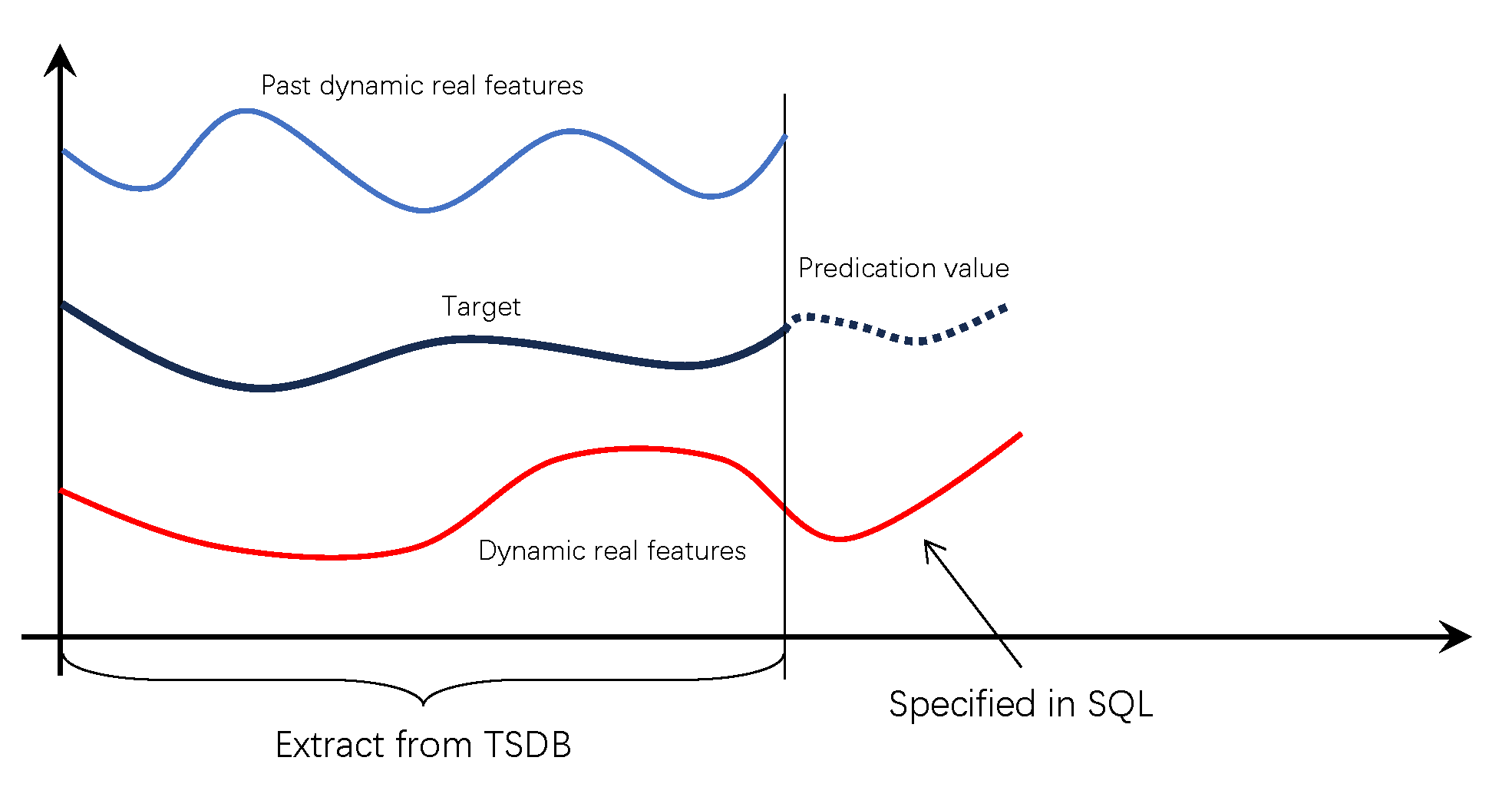
In the diagram above, there are two covariates and one target variable (also called the primary variable). Target is the forecasting objective, and Prediction value is the forecast result. Past dynamic real features represent historical covariates, while Dynamic real features represents future covariates.
Historical and future covariate data aligned with the same time window as the target variable are retrieved from the time-series database. Future covariate values corresponding to the prediction horizon must be provided directly in the SQL statement. Detailed usage is described below.
Historical Covariate Forecasting
Historical covariate forecasting is straightforward and can be invoked using the following statement (available in version 3.3.6.4 and later).
When the forecast function takes a single column as input, it operates in default univariate forecasting mode. When multiple columns are provided, the first column is treated as the primary variable, and subsequent columns are treated as covariates.
All input columns must be numeric. Each forecasting query supports up to 10 historical covariate columns. The following SQL example demonstrates covariate forecasting:
SELECT _frowts, forecast(val, past_co_val, 'algo=moirai') FROM foo;
In this example, the first column (val) is the primary variable; subsequent columns (past_co_val) are historical covariates.
Future Covariate Forecasting
For future covariate forecasting, you must specify the future input values and their associated covariate columns.
Future covariate values must be provided directly in the SQL statement using array syntax within square brackets, with values separated by spaces.
The number of values must match the forecasting horizon; otherwise, an error will occur.
Future covariates use the prefix dynamic_real_. If multiple future covariates are used, they can be named sequentially as dynamic_real_1, dynamic_real_2, dynamic_real_3, and so on.
For each future covariate, the corresponding column must be specified:
- The column for
dynamic_real_1is defined via the parameterdynamic_real_1_col - The column for
dynamic_real_2is defined viadynamic_real_2_col, and so on
In the example below, forecasting is performed on the val column. One historical covariate column past_co_val is provided, along with one future covariate column future_co_val. Future covariate values are supplied via dynamic_real_1, which contains 4 future values in the array. The parameter dynamic_real_1_col=future_co_val maps the future covariate to the future_co_val column.
select _frowts, forecast(val, past_co_val, future_co_val, "algo=moirai,rows=4, dynamic_real_1=[1 1 1 1], dynamic_real_1_col=future_co_val") from foo;
Built-In Forecasting Algorithms
- ARIMA
- HoltWinters
- Complex exponential smoothing (CES)
- Theta
- Prophet
- XGBoost
- LightGBM
- Multiple Seasonal-Trend decomposition using LOESS (MSTL)
- ETS (Error, Trend, Seasonal)
- Long Short-Term Memory (LSTM)
- Multilayer Perceptron (MLP)
- DeepAR
- N-BEATS
- N-HiTS
- Patch Time Series Transformer (PatchTST)
- Temporal Fusion Transformer
- TimesNet