Data Ingestion
This page describes standard SQL INSERT syntax. For high-throughput connector writes, or automatic table creation from a line protocol, also see:
- Parameter Binding: STMT / STMT2 prepared writes for high-throughput scenarios
- Schemaless Ingestion: InfluxDB / OpenTSDB line protocols that can create supertables and subtables from the payload
The examples share one set of tables. Supertable meters has data columns ts, current, voltage, and phase, and tag columns location and groupId. d1001 and d1002 are its subtables. For the timestamp range, rows with the same primary key, and partial success across vnodes, see Write Behavior.
Writing Syntax
Two forms are supported: normal syntax and supertable syntax. In normal syntax, the table name immediately after INSERT INTO is a subtable or a basic table. In supertable syntax, that name is a supertable.
Normal Syntax
INSERT INTO
    tb_name
        [USING stb_name [(tag1_name, ...)] TAGS (tag1_value, ...) [TTL value] [COMMENT 'string']]
        [(field1_name, ...)]
        VALUES (field1_value, ...) [(field1_value2, ...) ...] | FILE csv_file_path
    [tb2_name
        [USING stb_name [(tag1_name, ...)] TAGS (tag1_value, ...) [TTL value] [COMMENT 'string']]
        [(field1_name, ...)]
        VALUES (field1_value, ...) [(field1_value2, ...) ...] | FILE csv_file_path
    ...];

INSERT INTO tb_name [(field1_name, ...)] subquery
Supertable Syntax
INSERT INTO
    stb1_name [(field1_name, ...)]
        VALUES (field1_value, ...) [(field1_value2, ...) ...] | FILE csv_file_path
    [stb2_name [(field1_name, ...)]
        VALUES (field1_value, ...) [(field1_value2, ...) ...] | FILE csv_file_path
    ...];

INSERT INTO stb_name (tbname, field1_name, ...) subquery
Clause Notes
tb_name/stb_name: may be written asdb_name.tb_name. When the database name is omitted, the current database is used. Virtual tables, tables in system databases, and external tables from a federated query cannot be insert targets.USING ... TAGS: creates a subtable from a supertable while inserting. See Automatic Table Creation on Insert.TTLandCOMMENTtake effect only when the subtable is created. They have the same meaning as the options of the same name in Tables.(field1_name, ...): column list. Columns that do not appear are filled withNULL. The timestamp primary key must appear. When the table has a composite primary key, the second key column must appear as well. An insert into a supertable must give a column list that includestbname. See Insert into a Supertable.VALUES: each pair of parentheses is one row. Commas between rows, and between tables, may be omitted. Allowed values are listed below.FILE: reads a CSV file on the client machine. See Insert from a File.subquery: writes the result of a query. The query may be enclosed in parentheses. See Insert from a Query.
A value in VALUES may be:
- A constant: a number (including hexadecimal
0x10and binary0b1010),TRUE/FALSE, a single-quoted string, orNULL. - A time value:
NOW,TODAY, a time string or a long-integer timestamp, or arithmetic with a time unit, such asNOW + 1sandTODAY - 1d. - A function:
TO_BASE64,FROM_BASE64,MD5,SHA,SHA1,SHA2,AES_ENCRYPT,AES_DECRYPT,SM4_ENCRYPT, orSM4_DECRYPT. See Functions.
Examples
Insert a Single Record
Name an existing subtable or basic table and write one row with VALUES:
INSERT INTO d1001 VALUES (NOW, 10.2, 219, 0.32);
Values follow the column order of the table. Multiple NOW markers in one statement produce the same timestamp. See Timestamps.
Insert Multiple Records
Rows may omit the comma, or separate rows with a comma as in standard SQL:
INSERT INTO d1001 VALUES ('2021-07-13 14:06:32.272', 10.2, 219, 0.32) (1626164208000, 10.15, 217, 0.33);

INSERT INTO d1001 VALUES ('2021-07-13 14:06:32.272', 10.2, 219, 0.32), (1626164208000, 10.15, 217, 0.33);
When inserting multiple rows, do not write NOW for every timestamp. Use distinct values such as NOW and NOW + 1s.
Insert into Specific Columns
Whether the statement writes one row or many, it can assign only some columns. Columns that do not appear are filled with NULL. The timestamp primary key must appear and cannot be NULL.
INSERT INTO d1001 (ts, current, phase) VALUES ('2021-07-13 14:06:33.196', 10.27, 0.31);
Insert into Multiple Tables
One statement can write to several tables, and each table can specify its own columns. The comma between tables may be omitted:
INSERT INTO d1001 VALUES ('2021-07-13 14:06:34.630', 10.2, 219, 0.32) ('2021-07-13 14:06:35.779', 10.15, 217, 0.33)
            d1002 (ts, current, phase) VALUES ('2021-07-13 14:06:34.255', 10.27, 0.31);
These subtables may reside on different vnodes. If one vnode fails, rows already written on the other vnodes are not rolled back. See Partial Success.
Automatic Table Creation on Insert
If the table might not exist yet, use USING to create it from a supertable. When the table already exists, the statement does not create a new table and does not change tag values. Automatic creation requires the supertable name and TAGS.
INSERT INTO d21001 USING meters TAGS ('California.SanFrancisco', 2) VALUES ('2021-07-13 14:06:32.272', 10.2, 219, 0.32);
Only some tag columns may be specified. The others are NULL:
INSERT INTO d21005 USING meters (groupId) TAGS (2) VALUES ('2021-07-13 14:06:33.196', 10.15, 217, 0.33);
A new subtable can also be given a lifespan and a comment:
INSERT INTO d21004 USING meters TAGS ('California.SanFrancisco', 2) TTL 30 COMMENT 'from gateway' VALUES (NOW, 10.2, 219, 0.32);
One statement can create several tables:
INSERT INTO d21001 USING meters TAGS ('California.SanFrancisco', 2) VALUES ('2021-07-13 14:06:34.630', 10.2, 219, 0.32) ('2021-07-13 14:06:35.779', 10.15, 217, 0.33)
            d21002 USING meters (groupId) TAGS (2) VALUES ('2021-07-13 14:06:34.255', 10.15, 217, 0.33)
            d21003 USING meters (groupId) TAGS (2) (ts, current, phase) VALUES ('2021-07-13 14:06:34.255', 10.27, 0.31);
The statement is fully parsed before it runs. The following statement does not leave a table behind after the write fails:
INSERT INTO d1001 USING meters TAGS ('Beijing.Chaoyang', 2) VALUES ('a');
Insert from a File
Besides VALUES, data can be read from a CSV file. Values are separated by commas. Timestamps and strings are enclosed in single quotes. No header is required. For example, /tmp/csvfile.csv contains:
'2021-07-13 14:07:34.630', 10.2, 219, 0.32
'2021-07-13 14:07:35.779', 10.15, 217, 0.33
INSERT INTO d1001 FILE '/tmp/csvfile.csv';
When using FILE:
- The path is on the machine where the client runs, and the file must be UTF-8.
FILEis not supported when the connection goes through the taosAdapter proxy.- After
FILEappears in a statement, a later table in that statement cannot useVALUES.
To create subtables only, see Tables.
Automatic Table Creation and Insert
INSERT INTO d21001 USING meters TAGS ('California.SanFrancisco', 2) FILE '/tmp/csvfile.csv';
One statement can read a separate file for each table. When a table already exists, its tag values are not changed:
INSERT INTO d21001 USING meters TAGS ('California.SanFrancisco', 2) FILE '/tmp/csvfile_21001.csv'
            d21002 USING meters (groupId) TAGS (2) FILE '/tmp/csvfile_21002.csv';
Insert from a Query
INSERT ... SELECT writes the result of a query into an existing basic table or subtable, without exporting and importing the rows. The query may filter, compute expressions, aggregate, and use windows. Result columns are written into the target columns by position. The query cannot reference an external table from a federated query.
To copy a whole table, the result columns must be in the same order as the target table:
INSERT INTO d1002 SELECT * FROM d1001;
The whole query may be enclosed in parentheses. The parentheses mean a subquery, not a column list:
INSERT INTO d1002 (SELECT * FROM d1001);
When the target columns are listed, the names inside the parentheses are column names, and the result is written in that order. Columns that do not appear are filled with NULL. The timestamp cannot be omitted:
INSERT INTO d1002 (ts, current)
SELECT ts, current FROM d1001 WHERE current > 10;

INSERT INTO d1002 (ts, phase, current)
SELECT ts, phase, current + 1 FROM d1001;
The query can also be a window aggregation. The following statement downsamples d1001 by minute and writes one row per minute, with the average current, the maximum voltage, and the row count. _wstart is the window start time and is written into the timestamp column:
CREATE TABLE d1001_stat (ts TIMESTAMP, avg_current DOUBLE, max_voltage INT, cnt BIGINT);

INSERT INTO d1001_stat
SELECT _wstart, avg(current), max(voltage), count(*)
FROM d1001
WHERE ts >= '2021-07-13 14:00:00' AND ts < '2021-07-13 15:00:00'
INTERVAL(1m);
Columns are aligned by position, not by name. The statement fails when the result column count or types cannot be written into the target columns. For example, tb1 has columns ts, f1, and f2, while tba has columns ts, f1, f2, and f3, and the matching names have different types:
CREATE TABLE tb1 (ts TIMESTAMP, f1 INT, f2 BINARY(200));
CREATE TABLE tba (ts TIMESTAMP, f1 BINARY(10), f2 BIGINT, f3 DOUBLE);

-- Column count and types do not match
INSERT INTO tba SELECT * FROM tb1;

-- ts, f1, and f2 from the query are written into ts, f2, and f1; f3 is NULL
INSERT INTO tba (ts, f2, f1) SELECT * FROM tb1;
To write a query result into a supertable, the first entry in the column list must be tbname. See Insert into a Supertable.
Insert into a Supertable
An insert into a supertable must include tbname in the column list. tbname names the subtable. It is a string, needs no escaping, cannot contain a dot (.), and cannot be empty. Parameter binding supports this form only in STMT2. STMT does not. See Parameter Binding.
If the subtable does not exist, it is created with the given tags. If it already exists, tag values in the statement do not change the existing tags. When the column list contains no tag columns, a newly created subtable has NULL for every tag.
INSERT INTO meters (tbname, location, groupId, ts, current, voltage, phase)
            VALUES ('d31001', 'California.SanFrancisco', 2, '2021-07-13 14:06:34.630', 10.2, 219, 0.32)
            ('d31001', 'California.SanFrancisco', 2, '2021-07-13 14:06:35.779', 10.15, 217, 0.33)
            ('d31002', NULL, 2, '2021-07-13 14:06:34.255', 10.15, 217, 0.33);
Writing a query result also requires a column list, and tbname must be the first column of both the list and the query result. The following statement creates d31004 if it does not exist:
INSERT INTO meters (tbname, location, groupId, ts, current, voltage, phase)
SELECT 'd31004', 'California.SanFrancisco', 2, ts, current, voltage, phase
FROM d1001;
When one result contains several subtable names, group by tbname before writing. The following statement reads subtable d1001 and writes a new subtable:
INSERT INTO meters (tbname, location, groupId, ts, current, voltage, phase)
SELECT concat('copy_', tbname), 'California.SanFrancisco', 2, ts, current, voltage, phase
FROM d1001
PARTITION BY tbname;
Grouping and windows can be used together. The following statement downsamples each subtable of meters by minute and writes the result into supertable meters_1m. The new subtable name is the original name plus _1m, and the tags are copied from the original subtable. location and groupId must appear in PARTITION BY so the result can output those tag columns:
CREATE STABLE meters_1m (ts TIMESTAMP, avg_current DOUBLE, max_voltage INT, cnt BIGINT)
    TAGS (location BINARY(64), groupId INT);

INSERT INTO meters_1m (tbname, location, groupId, ts, avg_current, max_voltage, cnt)
SELECT concat(tbname, '_1m'), location, groupId, _wstart, avg(current), max(voltage), count(*)
FROM meters
WHERE ts >= '2021-07-13 14:00:00' AND ts < '2021-07-13 15:00:00'
PARTITION BY tbname, location, groupId
INTERVAL(1m);
A CSV file can be used as well. The file must be UTF-8, and its columns must follow the column list. For example, /tmp/csvfile_stb.csv contains:
'd31003', 'California.SanFrancisco', 2, '2021-07-13 14:08:34.630', 10.2, 219, 0.32
INSERT INTO meters (tbname, location, groupId, ts, current, voltage, phase)
            FILE '/tmp/csvfile_stb.csv';
Write Behavior
Timestamps
Every inserted row must contain a timestamp, and the timestamp cannot be NULL.
A table keeps one row for each primary key. Without a composite primary key, the timestamp alone identifies the row. With a composite primary key, the timestamp and the second key column identify the row together. See Tables for the composite primary key.
Timestamp formats are affected differently by the database time precision. A string timestamp is not affected by the precision of its database. A long-integer timestamp is. For example, the Unix seconds of 2021-07-13 16:16:48 are 1626164208. Write 1626164208000 for millisecond precision, 1626164208000000 for microsecond precision, and 1626164208000000000 for nanosecond precision.
When inserting multiple rows, do not set every timestamp to NOW. Those rows would share one timestamp and might overwrite each other, so not all of them would be kept. NOW is resolved to the client time of the SQL statement, and every NOW in that statement is replaced with the same value.
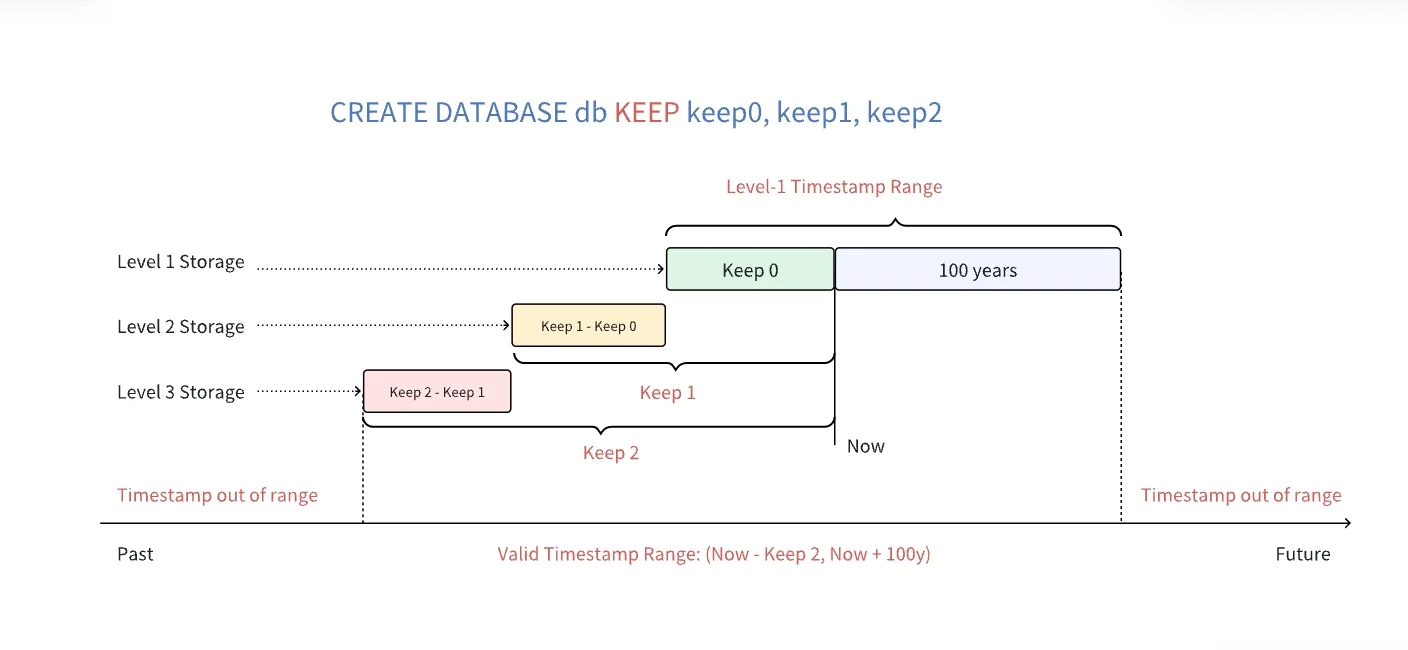
The newest timestamp allowed is the current time plus 100 years. For example, if the current time is 2024-11-11 12:00:00, the newest allowed timestamp is 2124-11-11 12:00:00. The oldest timestamp allowed depends on the database KEEP setting. The enterprise edition supports three storage tiers and can set multiple KEEP values. As shown below, if KEEP is 100h,100d,3650d, the oldest allowed timestamp is the current time minus 3650 days. Data with timestamps in [Now - 100h, Now + 100y) is kept on tier-1 storage, data in [Now - 100d, Now - 100h) on tier-2, and data in [Now - 3650d, Now - 100d) on tier-3. The community edition does not support multi-tier storage and can configure only one KEEP value; if several values are configured, the maximum is used. If a timestamp is outside the valid range, TDengine returns the error Timestamp out of range.
Partial Success
An INSERT is fully parsed, then sent to the vnodes it involves. Subtables may reside on different vnodes, and each vnode writes independently. If one vnode fails because of a network or disk fault, rows already written on the other vnodes are not rolled back.