Security Deployment and Hardening Suggestions
Component-level hardening guidance; for layered security capabilities, see the Security Guide home.
Background
The distributed and multi-component nature of TDengine makes security configuration a common production concern. This document explains security considerations for TDengine components and deployment methods, and provides deployment and configuration suggestions. For transport certificate steps, see Full-Trace Transport Security and Compression; for client practices, see Client and Connector Security; for account and authorization practices, see Full-Trace Authentication · Practice Suggestions; for audit configuration, see Audit and Compliance.
Components Involved in Security Configuration
TDengine includes multiple components:
taosd: Core component.taosc: Client library.taosAdapter: REST API and WebSocket service.taosKeeper: Monitoring service component.taosX: Data pipeline and backup recovery component.taosX-Agent: Auxiliary component for external data source access.taosExplorer: Web visualization management interface.
In addition to TDengine deployment and applications, there are also the following components:
- Applications that access and use the TDengine database through various connectors.
- External data sources: Other data sources that access TDengine, such as MQTT, OPC, Kafka, etc.
The relationship between the components is as follows:
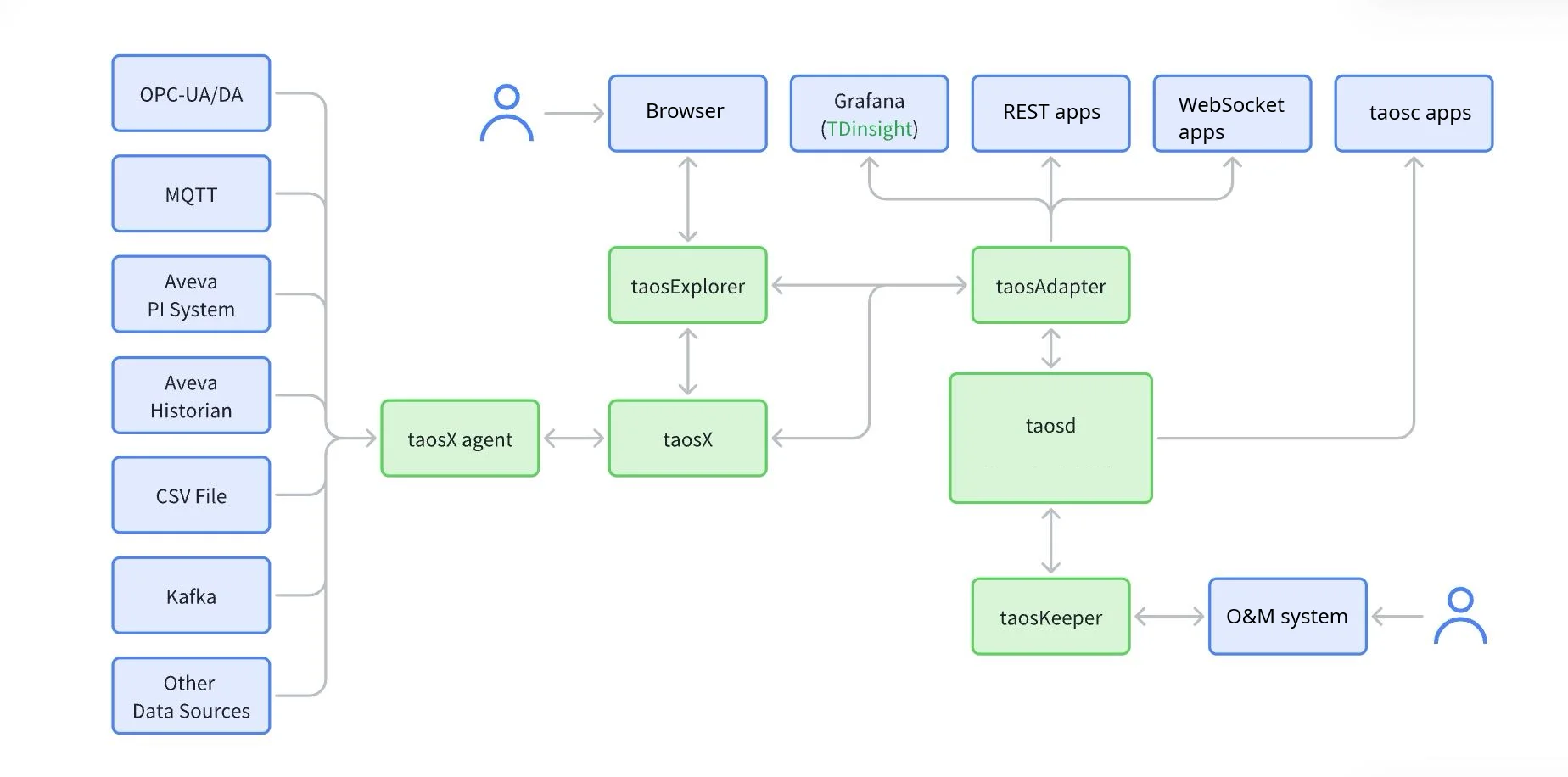
For detailed component descriptions, see Overview and Architecture.
TDengine Security Settings
taosd
taosd clusters exchange data over TCP with a proprietary protocol. Transport can be plaintext by default, so production deployments should enable TLS (enableTLS and certificate parameters; see Full-Trace Transport Security and Compression).
Enabling compression can reduce bandwidth usage, but it does not replace transport encryption.
- compressMsgSize: Whether to compress RPC messages. Integer, optional:
-1: do not compress any messages;0: compress all messages;N(N > 0): only compress messages larger thanNbytes.
To make database operations traceable, enable auditing in Enterprise deployments. For complete parameters and audit database constraints, see Audit and Compliance and taosd.
- audit: Audit function switch,
0disables and1enables auditing. Enterprise default is enabled. - auditInterval: Reporting interval in milliseconds. Default
5000. - auditLevel: Audit level (
1-5, default3). - auditCreateTable: Whether to audit child-table creation.
0disables and1enables it. Default enabled. - auditSaveInSelf: Whether to record audit logs in the local cluster without
taosKeeper(v3.4.1.0+).
To secure data files, enable transparent data encryption; see Data-at-Rest Protection. For v3.4+, the recommended path is to generate hierarchical keys with taosk, then specify ENCRYPT_ALGORITHM per database.
- encryptAlgorithm / encryptScope: Enterprise parameters that declare algorithms and encryption scopes. Their relationship to the
taoskmain path is described in Data-at-Rest Protection.
Enabling the whitelist can restrict access addresses and further enhance privacy.
- enableWhiteList: Allowlist switch,
0disables and1enables it; default disabled. User-sideHOST/NOT_ALLOW_HOSTsettings are described in Users · IP Allowlist and Blocklist.
taosc
Users and other components use the native client library (taosc) and TDengine's private protocol to connect to taosd. Configure client and server TLS / CA consistently; see Full-Trace Transport Security and Compression and Client and Connector Security.
taosAdapter
taosAdapter uses the native client library (taosc) and TDengine's private protocol to connect to taosd, and also supports RPC message compression.
Applications and other components connect to taosAdapter through various language connectors. By default, the connection is based on HTTP 1.1 and is not encrypted. To ensure the security of data transmission between taosAdapter and other components, SSL encrypted connections need to be configured. Modify the following configuration in the /etc/taos/taosadapter.toml configuration file:
[ssl]
enable = true
certFile = "/path/to/certificate-file"
keyFile = "/path/to/private-key"
Configure HTTPS/SSL access in the connector to complete encrypted access.
The taosAdapter [ssl] section is an Enterprise feature. See Full-Trace Transport Security and Compression for setup instructions.
In production, set debug to false; when it is true, /debug/pprof is exposed. To further harden access, enable the allowlist in taosd, which also applies to taosAdapter. When access goes through Adapter, account allowlists usually see the Adapter host IP. To control by original client IP, handle it at the gateway layer; see Full-Trace Authentication.
taosX
taosX includes REST API and gRPC interfaces, where the gRPC interface is used for taosX-Agent connections.
- The REST API interface is based on HTTP 1.1 and is not encrypted, posing a security risk.
- The gRPC interface is based on HTTP 2 and is not encrypted, posing a security risk.
To ensure data security, it is recommended that the taosX API interface is limited to internal access only. Modify the following configuration in the /etc/taos/taosx.toml configuration file:
[serve]
listen = "127.0.0.1:6050"
grpc = "127.0.0.1:6055"
Starting with TDengine v3.3.6.0, taosX supports HTTPS connections. Add the following configuration in the /etc/taos/taosx.toml file:
[serve]
ssl_cert = "/path/to/server.pem"
ssl_key = "/path/to/server.key"
ssl_ca = "/path/to/ca.pem"
To specify certificates for gRPC separately, configure grpc_ssl_cert / grpc_ssl_key / grpc_ssl_ca; see Full-Trace Transport Security and Compression.
Then change the API address to HTTPS in taosExplorer:
# Local connection to taosX API
x_api = "https://127.0.0.1:6050"
# Public IP or domain address
grpc = "https://public.domain.name:6055"
taosExplorer
Similar to the taosAdapter component, the taosExplorer component provides HTTP services for external access. Modify the following configuration in the /etc/taos/explorer.toml configuration file:
[ssl]
# SSL certificate file
certificate = "/path/to/ca.file"

# SSL certificate private key
certificate_key = "/path/to/key.file"
Then, use HTTPS to access taosExplorer, for example https://192.168.12.34:6060.
taosX-Agent
After taosX enables HTTPS, taosX-Agent and taosX use HTTP/2 encrypted connections and Arrow Flight RPC for data exchange. The payload is binary, and only registered taosX-Agent connections are valid.
It is recommended to always enable HTTPS connections for taosX-Agent services in insecure or public network environments.
taosKeeper
taosKeeper uses WebSocket connections to communicate with taosAdapter, writing monitoring information reported by other components into TDengine. In classic deployments, it can also receive and forward audit logs; see Audit and Compliance.
The current version of taosKeeper has security risks:
- The default listening address is broad, and exposing port
6043to the public network creates attack risk. Bindhostthrough configuration, startup parameters, or environment variables to localhost or an internal address, and restrict access with firewalls. This risk can be ignored when Docker or Kubernetes deployments do not expose the port. Note that this port has no authentication for reporters. - The configuration file contains plaintext passwords, so the visibility of the configuration file needs to be reduced. In
/etc/taos/taoskeeper.toml:
[tdengine]
host = "localhost"
port = 6041
username = "root"
password = "taosdata"
usessl = false
In production, set usessl to true with taosAdapter SSL, and avoid default credentials.
Security Enhancements
We recommend using TDengine within a local area network.
If you must provide access outside the local area network, consider the following configurations. For a fuller gateway discussion on authentication, see Full-Trace Authentication · API Gateway.
Load Balancing
Use load balancing to provide taosAdapter services externally.
Take Nginx as an example to configure multi-node load balancing:
http {
    server {
        listen 6041;

        location / {
            proxy_pass http://websocket;
            # Headers for websocket compatible
            proxy_http_version 1.1;
            proxy_set_header Upgrade $http_upgrade;
            proxy_set_header Connection $connection_upgrade;
            # Forwarded headers
            proxy_set_header X-Forwarded-For $proxy_add_x_forwarded_for;
            proxy_set_header X-Forwarded-Proto $scheme;
            proxy_set_header X-Forwarded-Host $host;
            proxy_set_header X-Forwarded-Port $server_port;
            proxy_set_header X-Forwarded-Server $hostname;
            proxy_set_header X-Real-IP $remote_addr;
        }
    }

    upstream websocket {
        server 192.168.11.61:6041;
        server 192.168.11.62:6041;
        server 192.168.11.63:6041;
   }
}
If the taosAdapter component is not configured with SSL secure connections, SSL needs to be configured to ensure secure access. SSL can be configured at a higher-level API Gateway or in Nginx; if you have stronger security requirements for the connections between components, you can configure SSL in all components. The Nginx configuration is as follows:
http {
    server {
        listen 443 ssl;

        ssl_certificate /path/to/your/certificate.crt;
        ssl_certificate_key /path/to/your/private.key;
    }
}
Security Gateway
In modern internet production systems, the use of security gateways is also very common. traefik is a good open-source choice. We take traefik as an example to explain the security configuration in the API gateway.
Traefik provides various security configurations through middleware, including:
- Authentication: Traefik provides multiple authentication methods such as BasicAuth, DigestAuth, custom authentication middleware, and OAuth 2.0.
- IP Whitelist: Restrict the allowed client IPs.
- Rate Limit: Control the number of requests sent to the service.
- Custom Headers: Add configurations such as
allowedHoststhrough custom headers to improve security.
A common middleware example is as follows:
labels:
  - "traefik.enable=true"
  - "traefik.http.routers.tdengine.rule=Host(`api.tdengine.example.com`)"
  - "traefik.http.routers.tdengine.entrypoints=https"
  - "traefik.http.routers.tdengine.tls.certresolver=default"
  - "traefik.http.routers.tdengine.service=tdengine"
  - "traefik.http.services.tdengine.loadbalancer.server.port=6041"
  - "traefik.http.middlewares.redirect-to-https.redirectscheme.scheme=https"
  - "traefik.http.middlewares.check-header.headers.customrequestheaders.X-Secret-Header=SecretValue"
  - "traefik.http.middlewares.check-header.headers.customresponseheaders.X-Header-Check=true"
  - "traefik.http.middlewares.tdengine-ipwhitelist.ipwhitelist.sourcerange=127.0.0.1/32, 192.168.1.7"
  - "traefik.http.routers.tdengine.middlewares=redirect-to-https,check-header,tdengine-ipwhitelist"
The above example completes the following configurations:
-
TLS authentication uses the
defaultconfiguration, which can be configured in the configuration file or traefik startup parameters, as follows:traefik:
image: "traefik:v2.3.2"
hostname: "traefik"
networks:
- traefik
command:
- "--log.level=INFO"
- "--api.insecure=true"
- "--providers.docker=true"
- "--providers.docker.exposedbydefault=false"
- "--providers.docker.swarmmode=true"
- "--providers.docker.network=traefik"
- "--providers.docker.watch=true"
- "--entrypoints.http.address=:80"
- "--entrypoints.https.address=:443"
- "--certificatesresolvers.default.acme.dnschallenge=true"
- "--certificatesresolvers.default.acme.dnschallenge.provider=alidns"
- "--certificatesresolvers.default.acme.dnschallenge.resolvers=ns1.alidns.com"
- "--certificatesresolvers.default.acme.email=ops@example.com"
- "--certificatesresolvers.default.acme.storage=/letsencrypt/acme.json"
The startup parameters configure the default TLS certificate resolver and automatic ACME authentication for certificate issuance and renewal. Replace the email and DNS provider according to the actual environment.
-
Middleware
redirect-to-https: Configure redirection from HTTP to HTTPS, forcing the use of secure connections.- "traefik.http.middlewares.redirect-to-https.redirectscheme.scheme=https" -
Middleware
check-header: Configure custom header checks. External access must add custom headers and match header values to prevent unauthorized access. This is a very simple and effective security mechanism when providing API access. -
Middleware
tdengine-ipwhitelist: Configure IP whitelist. Only allow specified IPs to access, using CIDR routing rules for matching, and can set internal and external IP addresses.
Summary
Data security is a key indicator of the TDengine product. These measures are designed to protect TDengine deployments from unauthorized access and data breaches while maintaining performance and functionality. However, TDengine configuration alone is not sufficient; deployments must be secured together with the surrounding business system. For known vulnerabilities and fixed versions, see Security Advisories.