Usage and Availability
This page describes instance-level usage visibility in CLS and how CLS is deployed today. For deployment, see Deploy and Activate. For the slot model, see Quotas and Slots.
Instance-level usage
After TSDB / IDMP are configured for CLS, the CLS console can show licensing-related runtime information, including:
- Which TSDB / IDMP instances (clusters) are connected to CLS;
- Current usage versus limits for authorization items;
- Summary information on cluster list and usage pages.
Example entry points:
- Cluster page: connected clusters

- Cluster Usage page: authorization-item usage
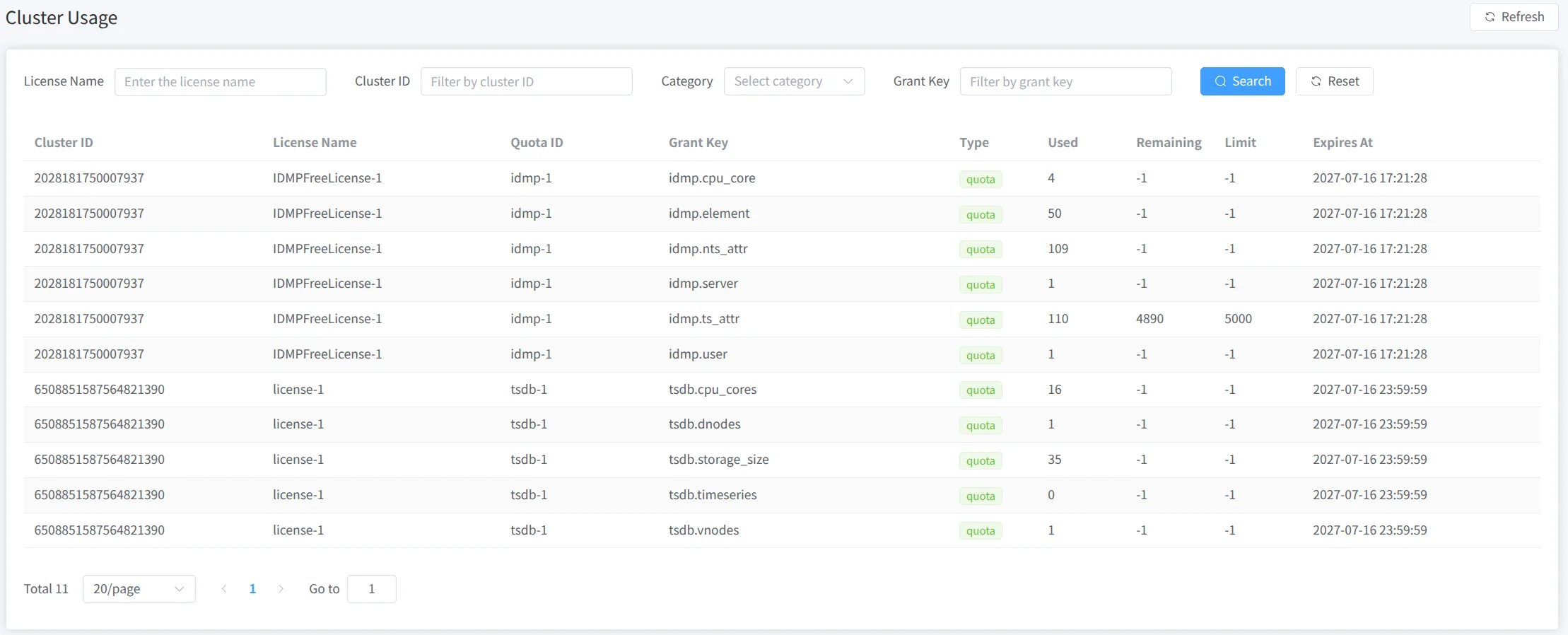
When CLS can reach ELS, related information can sync to ELS for provider-side audit and renewal. Mapping usage to downstream business customers usually still needs your own customer/tenant ledger and slot-naming conventions; the licensing system meters by license and slot.
CLS deployment shape
CLS is currently a lightweight single-node service without built-in high availability or automatic failover. If production needs process-level redundancy, evaluate host backup or cold standby yourself.
In practice, run CLS on a stable, monitored host and watch process and disk health. When changing the maximum slot count or syncing/importing license material, use a maintenance window and confirm the result. In multi-instance setups, avoid placing CLS on highly unstable nodes.
How long connected TSDB / IDMP keep running if CLS is briefly unavailable depends on the product version and license type. Instances should still communicate with CLS according to configuration (for example clsRefreshInterval).