TDengine Subscription
The features or components discussed in this document are available in TDengine TSDB-Enterprise only. TDengine TSDB-OSS does not include these features or components.
This document describes how to use taosExplorer to subscribe to data from another cluster to this cluster.
Preparation
Create the required Topic in the source cluster, which can subscribe to the entire database, supertable, or subtable. In this example, we demonstrate subscribing to a database named test.
Step One: Enter the "Data Subscription" page
Open the taosExplorer interface of the source cluster, click the "Data Subscription" menu on the left, then click "Add New Topic".
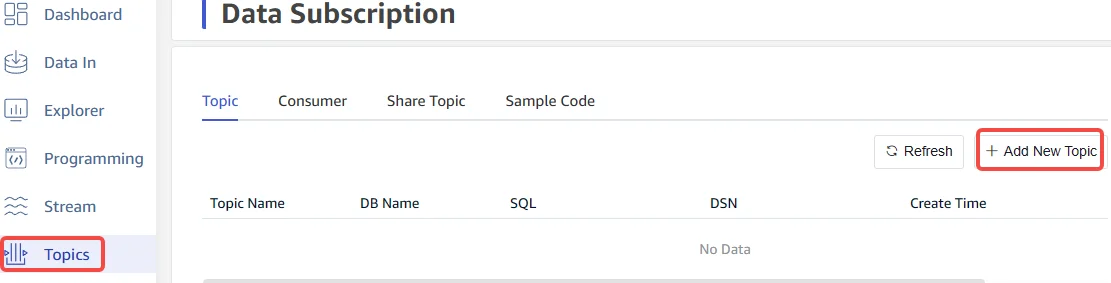
Step Two: Add a New Topic
Enter the topic name, select the database to subscribe to.

Step Three: Copy the Topic's DSN
Click the "Create" button, return to the topic list and copy the DSN of the topic for later use.

Create Subscription Task
Step One: Enter the "Add Data Source" page
- Click the "Data Writing" menu on the left
- Click "Add Data Source"

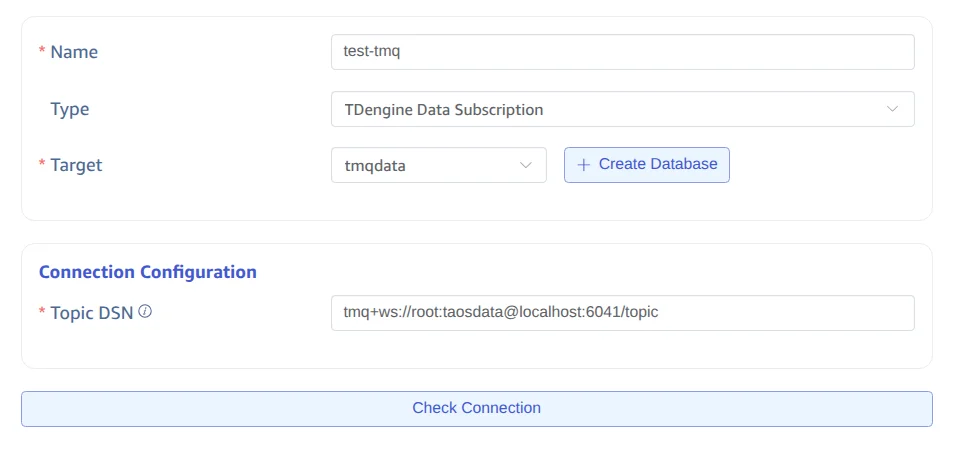
Step Two: Enter Data Source Information
- Enter the task name
- Select the task type "TDengine Data Subscription"
- Select the target database
- Paste the DSN copied in the preparation step into the Topic DSN field. For example: tmq+ws://root:taosdata@localhost:6041/topic
- After completing the above steps, click the "Connectivity Check" button to test connectivity with the source
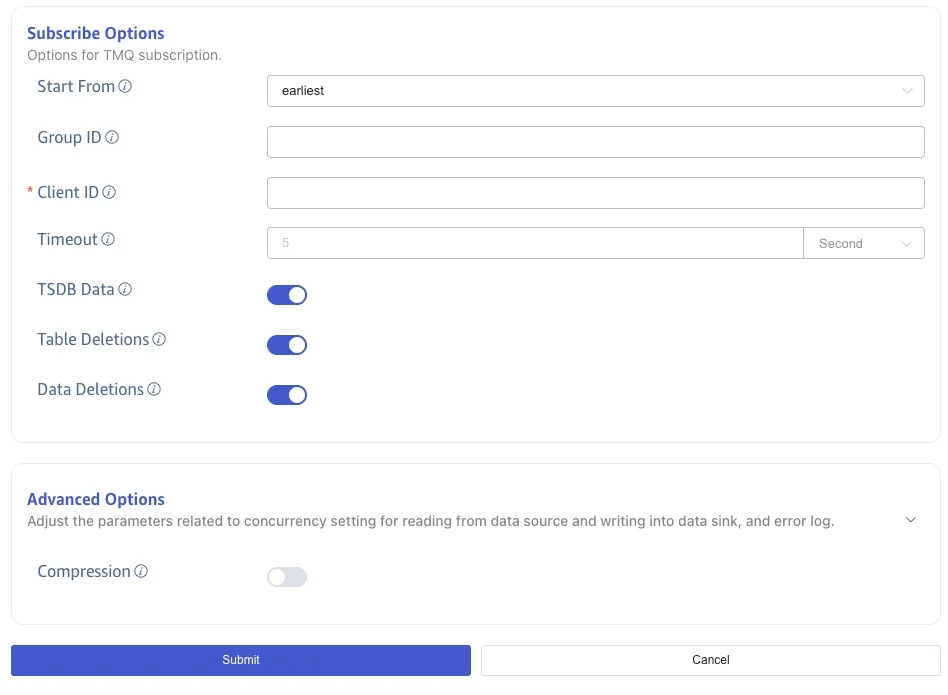
Step Three: Fill in Subscription Settings and Submit Task
- Choose the subscription start position. Configurable to start from the earliest or latest data, default is earliest
- Set the timeout period. Supports units ms (milliseconds), s (seconds), m (minutes), h (hours), d (days), M (months), y (years)
- Set the subscription group ID. The subscription group ID is an arbitrary string used to identify a subscription group, with a maximum length of 192. If not specified, a randomly generated group ID will be used.
- Set the client ID. The client ID is an arbitrary string used to identify the client, with a maximum length of 192.
- Synchronize data that has been written to disk. If enabled, it can synchronize data that has been written to the TSDB time-series data storage file (i.e., not in WAL). If disabled, only data that has not yet been written to disk (i.e., saved in WAL) will be synchronized.
- Synchronize table deletion operations. If enabled, table deletion operations will be synchronized to the target database.
- Synchronize data deletion operations. If enabled, data deletion operations will be synchronized to the target database.
- Compression. Enable WebSocket compression support to reduce network bandwidth usage.
- Click the "Submit" button to submit the task
Transform Actions
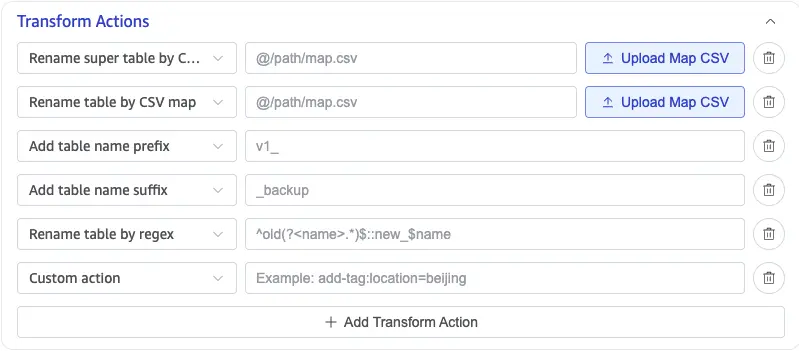
TDengine Data Subscription supports Transform Actions when you create or edit a task. Transform actions adjust destination table metadata, such as table names, supertable names, and tags, before taosX writes the data. You can add multiple actions to a task.
| Transform action | Effect | Configuration |
|---|---|---|
| Rename super table by CSV map | Maps specified source supertables to destination supertable names and updates the USING supertable reference in child-table metadata. | Upload a CSV mapping file or enter the mapping file path. |
| Rename table by CSV map | Rewrites destination table names from the mapping file. For child tables, both the table name and its referenced supertable are updated. | Upload a CSV mapping file or enter the mapping file path. |
| Add table name prefix | Adds a fixed prefix to destination table names. | For example, v1_ changes meters to v1_meters. |
| Add table name suffix | Adds a fixed suffix to destination table names. | For example, _backup changes meters to meters_backup. |
| Rename table by regex | Matches and replaces destination table names with a regular expression. | Enter <regular_expression>::<replacement>, for example, ^old(?<name>.*)$::new_$name. |
| Custom action | Configures a valid taosX -T transform action that is not provided by the list. | For example, add-tag:location=beijing adds a tag named location with the value beijing. |
Each row in a CSV mapping file contains a source name and a destination name in the format source_name,target_name; do not include a header row. After you upload a mapping CSV file, taosExplorer fills in the file reference with the @ prefix automatically.
Monitor Task Execution
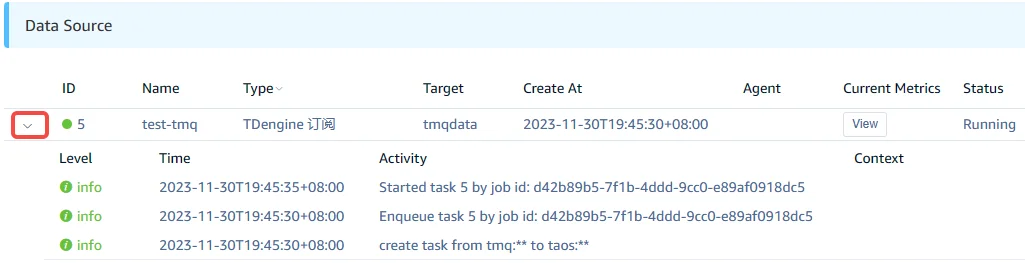
After submitting the task, return to the data source page to view the task status. The task will first be added to the execution queue and will start running shortly.

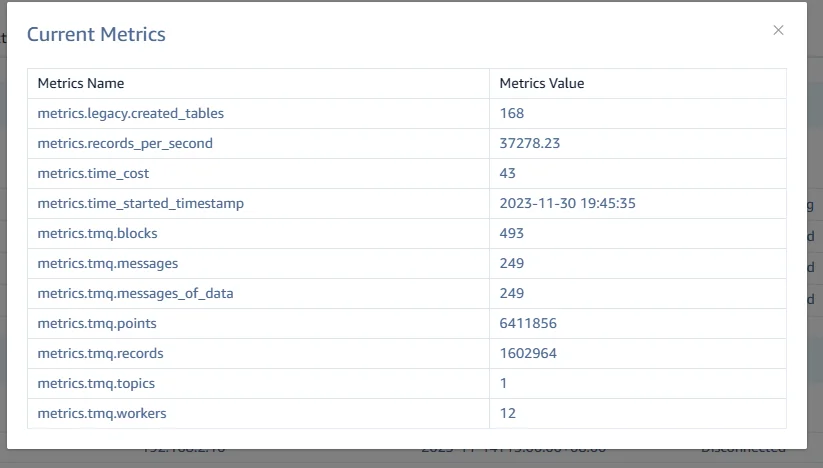
Click the "View" button to monitor the dynamic statistical information of the task.
You can also click the left collapse button to expand the task's activity information. If the task runs abnormally, detailed explanations can be seen here.
Advanced Usage
- FROM DSN supports multiple Topics, with multiple Topic names separated by commas. For example:
tmq+ws://root:taosdata@localhost:6041/topic1,topic2,topic3 - In the FROM DSN, you can also use the database name, supertable name, or subtable name instead of the Topic name. For example:
tmq+ws://root:taosdata@localhost:6041/db1,db2,db3, in this case, there is no need to create a Topic in advance, taosX will automatically recognize that a database name is used and automatically create a subscription Topic in the source cluster. - FROM DSN supports the group.id parameter, to explicitly specify the group ID used for subscription. If not specified, a randomly generated group ID will be used.