Ignition OPC UA Server Integration Guide
This page describes how to ingest data from an Ignition Gateway into TDengine TSDB through OPC UA. It covers two typical scenarios:
- Cross-server anonymous connection (intended for short-lived internal testing only)
- Cross-server certificate-encrypted connection with username authentication (recommended for production)
OPC UA security has two distinct layers; understanding the split makes troubleshooting much easier.
Secure Channel
Provides transport-layer encryption that prevents eavesdropping and tampering between client and server. Requires:
- Secure Channel Certificate: the taosX client's own certificate, presented to the OPC UA server for identification.
- Certificate's Private Key: the matching private key, used for signing and decryption.
Authentication
Verifies the user identity that opens the session. Three options are supported:
- Anonymous: anonymous access (must be allowed by the server).
- Username: username + password.
- Certificate: certificate-based user identity (requires a certificate-to-user mapping on the server).
The certificate that you can download from Ignition (for example ignition-server.der) is the server's own certificate and cannot be used as a client certificate. You must generate a separate client certificate and private key as described in Generate the taosX OPC UA Client Certificate.
1. Ignition server-side configuration
Open Ignition Gateway → Config → Connections → OPC → OPC UA Server Settings → General Settings.
1.1 Endpoint settings
| Setting | Recommended value | Notes |
|---|---|---|
| Bind Port | 62541 | OPC UA listening port |
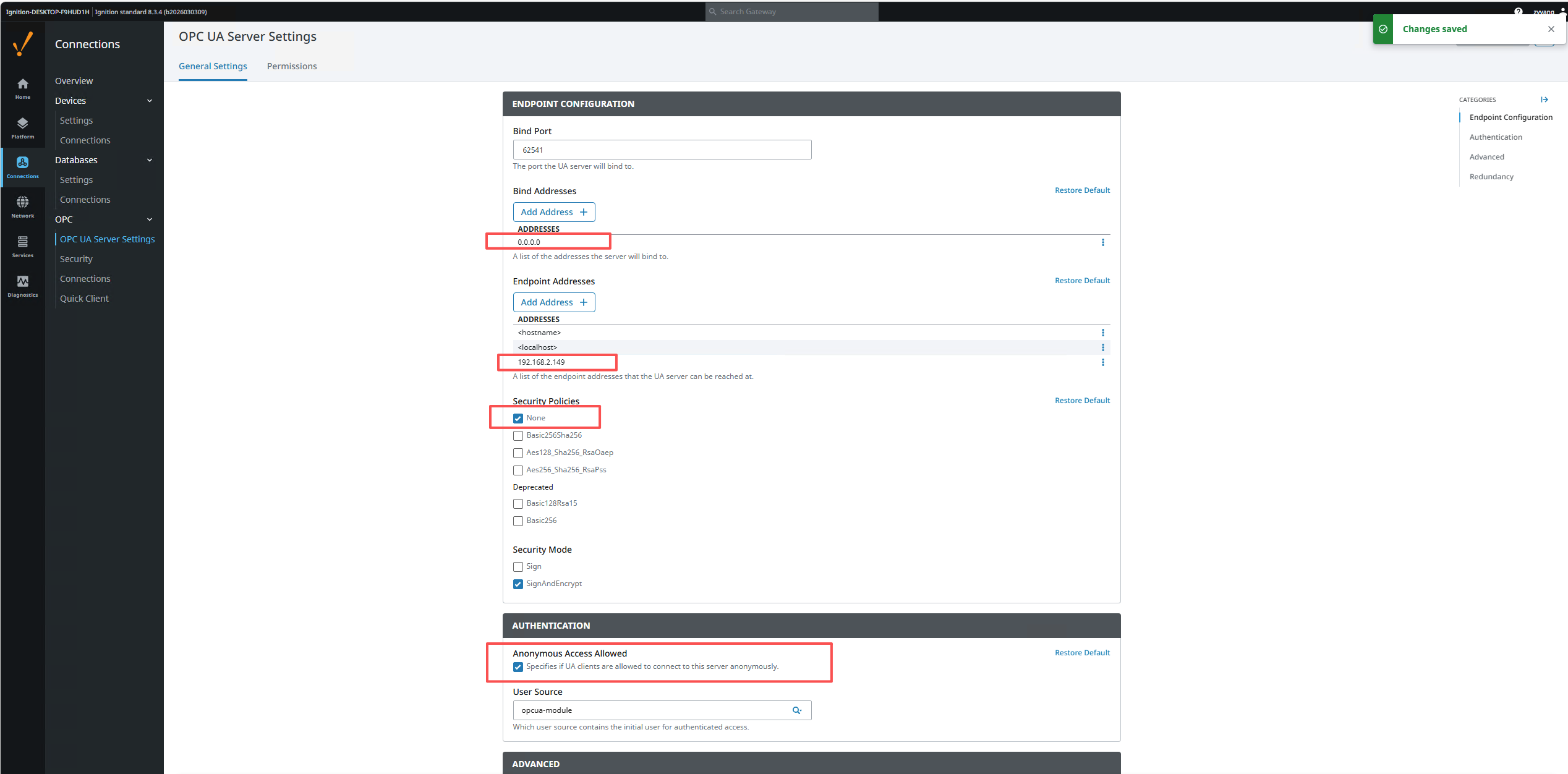
| Bind Addresses | 0.0.0.0 | If TDengine TSDB and Ignition are on different servers, this must be set to 0.0.0.0 |
| Endpoint Addresses | Add the server IP | For example 192.168.2.149, so the client can reach the endpoint |
| Security Policies | [x] Basic256Sha256 | Enable the policies you intend to use |
| Security Mode | [x] SignAndEncrypt | Enable signed-and-encrypted mode |
1.2 Authentication settings
In the AUTHENTICATION section on the same page:
For Username authentication, set the User Source to default (recommended) instead of opcua-module.
Use default for User Source. The built-in opcua-module source is independent and requires extra user/permission setup, which often causes StatusBadUserAccessDenied errors.
1.3 Permissions
Switch to the Permissions tab and confirm that the AuthenticatedUser role has the required permissions:
| Role | Browse | Read | Write | Call |
|---|---|---|---|---|
| AuthenticatedUser | [x] | [x] | [x] | [x] |
Default Tag Provider Permissions must be configured the same way.
2. Cross-server anonymous connection
After installing and starting Ignition, go to Connections > OPC > OPC server settings.
The default Ignition configuration is bound to localhost, and the endpoint addresses include <hostname> and localhost:
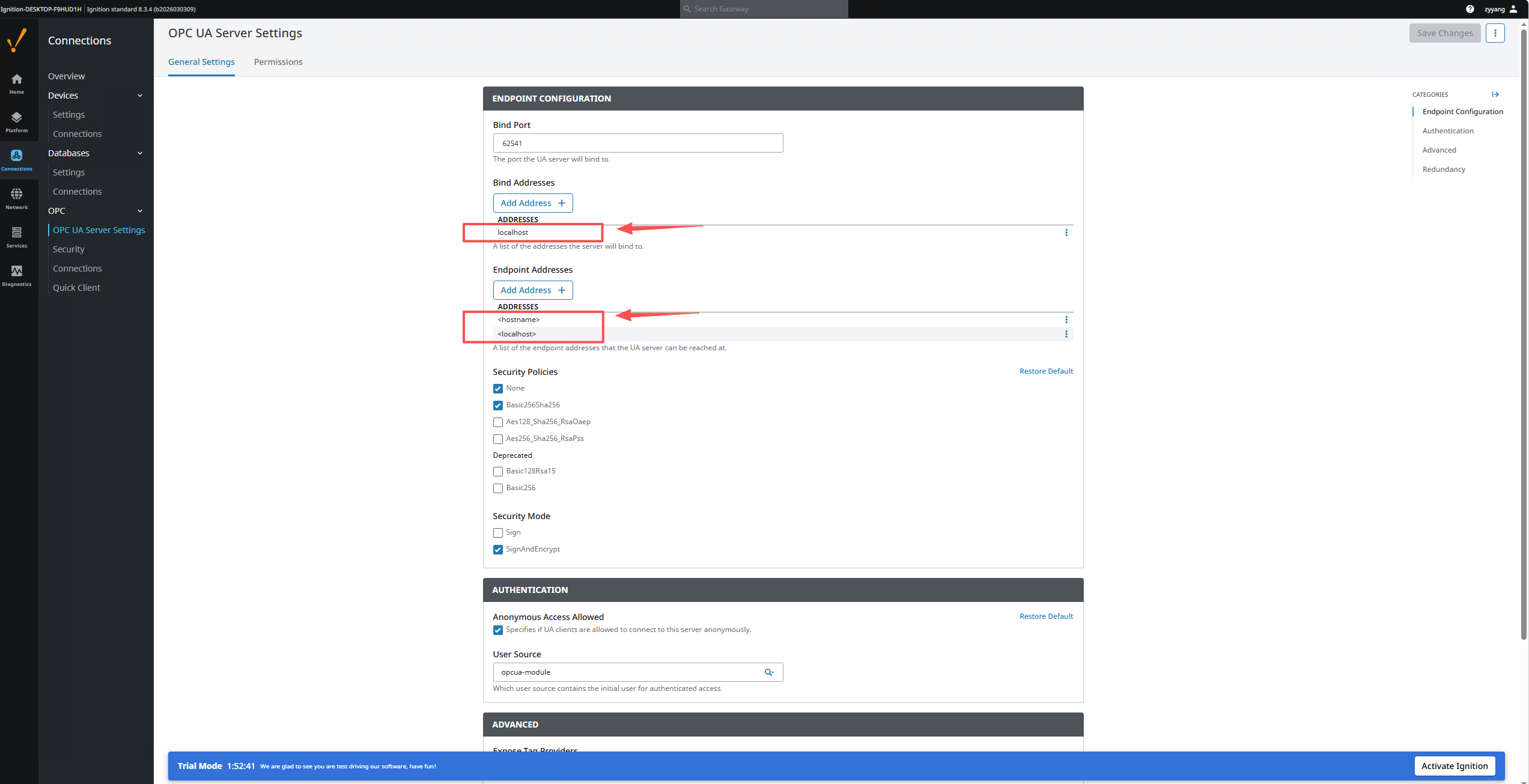
In that state, if TDengine TSDB and Ignition live on different servers the connection will fail because Ignition only listens on the local port 62541. Change Bind Addresses to 0.0.0.0 and add the Ignition server IP to the endpoint addresses:
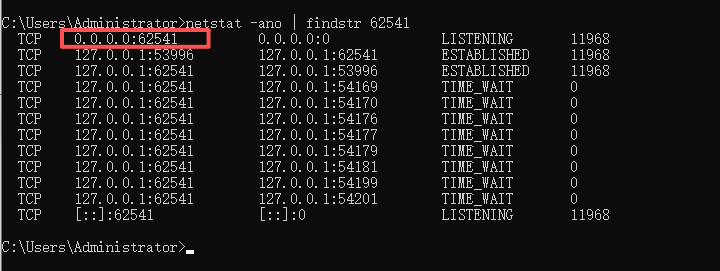
You can verify that Ignition now listens on 0.0.0.0:62541 from cmd:
netstat -ano | findstr 62541
After the changes you can connect TDengine TSDB Explorer to Ignition with anonymous mode:
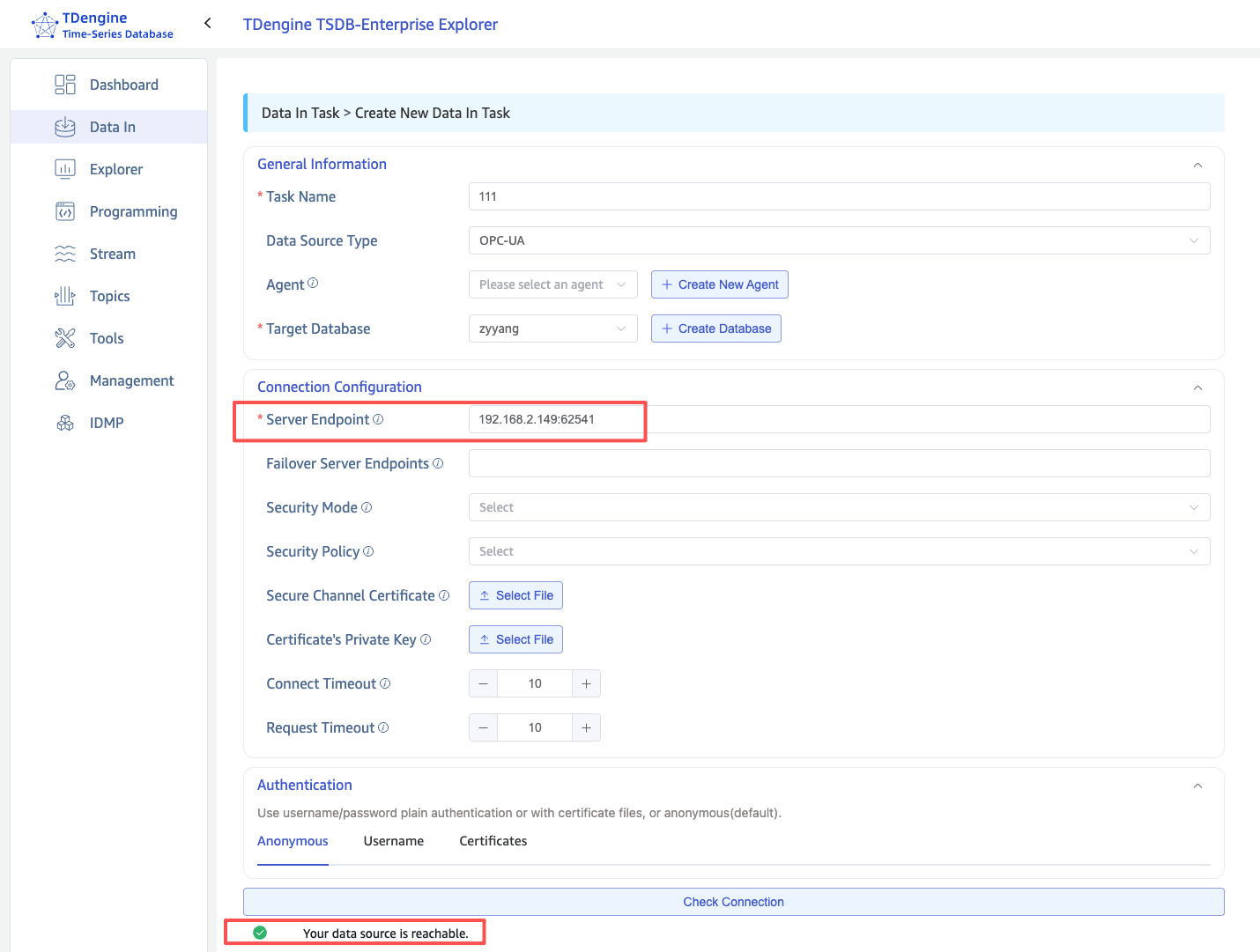
Anonymous mode performs no identity check and no transport-layer encryption. Use it only for short-lived testing on a trusted network; switch to certificate encryption for production.
3. Certificate encryption + username authentication
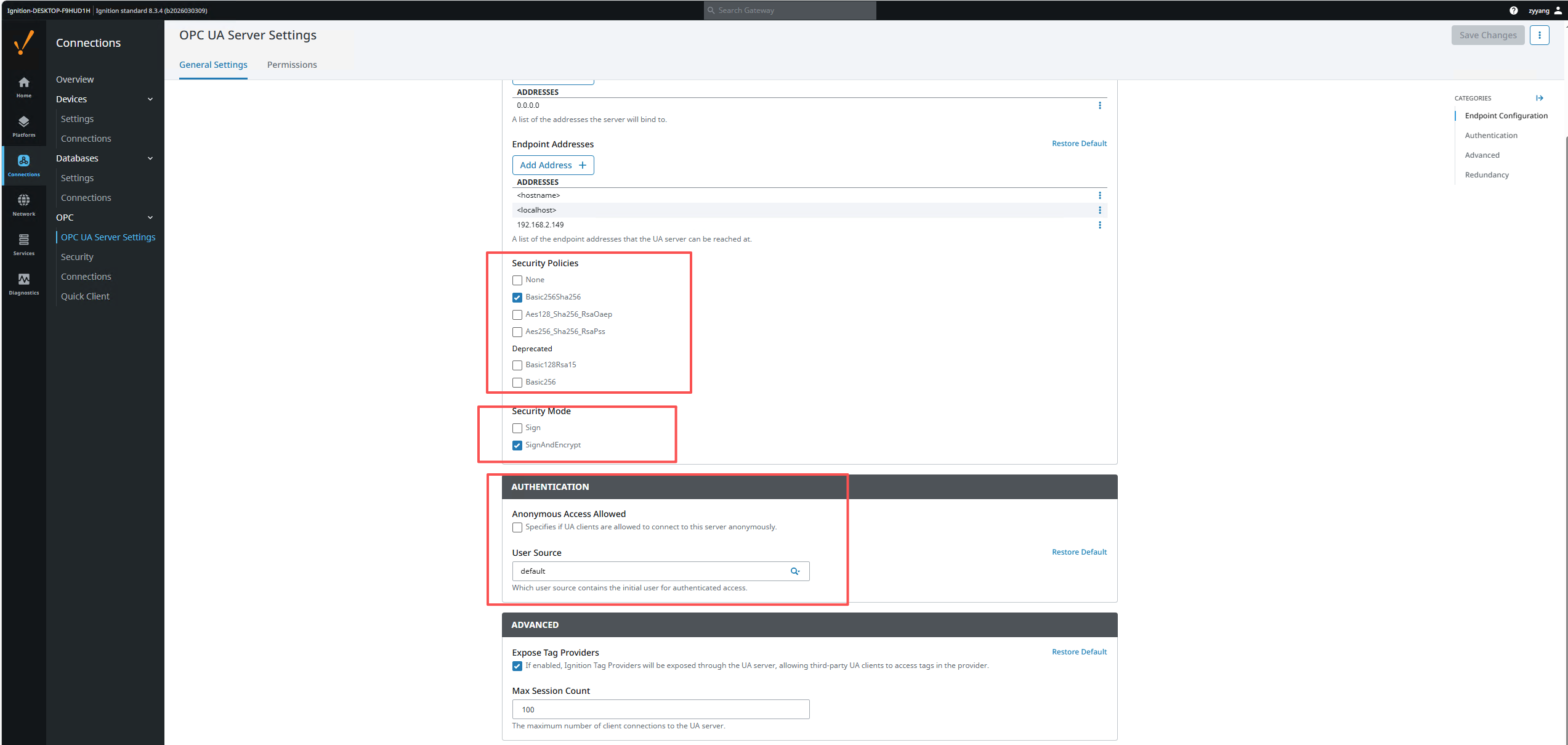
3.1 Enable SignAndEncrypt on Ignition
Adjust the configuration as shown and save:
- Security Policy:
Basic256Sha256 - Security Mode:
SignAndEncrypt - User Source:
default
3.2 Generate the client certificate
Follow Generate the taosX OPC UA Client Certificate on any machine to produce client_cert.pem and client_key.pem.
3.3 Trust the client certificate inside Ignition
Once the certificate is generated, Ignition must explicitly trust it:
- In Explorer, run Check Connection once with the new certificate. It will fail — that is expected.
- Open Ignition Gateway → Config → Connections → OPC → Security → Server tab.
- Locate the
taosx-opc-clientcertificate under Quarantined Certificates. - Click the right-hand ⋮ menu → Trust.
- Confirm the certificate has moved into the Trusted Certificates list.
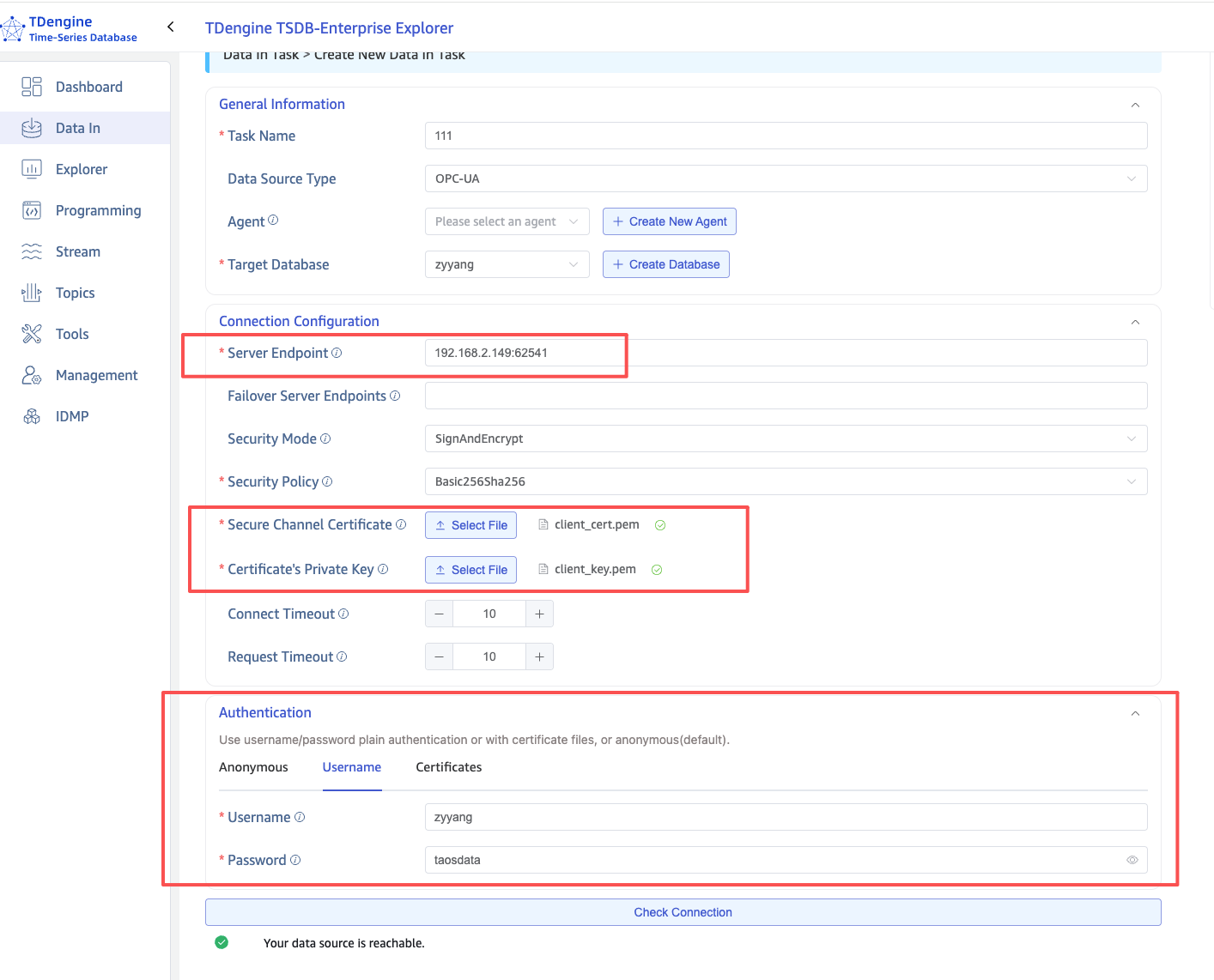
3.4 Configure the connection in Explorer
In TDengine TSDB Explorer → Data In → Create New Data In Task, choose OPC UA as the source type.
Connection Configuration
| Setting | Value | Notes |
|---|---|---|
| Server Endpoint | 192.168.2.149:62541 | Ignition server IP + port |
| Security Mode | SignAndEncrypt | Must match the Ignition side |
| Security Policy | Basic256Sha256 | Must match the Ignition side |
| Secure Channel Certificate | Upload client_cert.pem | The client certificate |
| Certificate's Private Key | Upload client_key.pem | The client private key |
Authentication
Switch to the Username tab and enter a username/password that exists in the configured Ignition User Source.
Run Check Connection again to validate:
4. Troubleshooting
| Error | Cause | Resolution |
|---|---|---|
StatusBadIdentityTokenInvalid (0x80200000) | Identity token rejected. Usually the wrong authentication method, or the certificate is not accepted by the server. | If using Certificate authentication, switch to Username; verify the Ignition User Source is configured correctly. |
StatusBadUserAccessDenied (0x801F0000) | Credentials are correct but the user has no rights — typically the user is not in the configured User Source. | Set Ignition User Source to default and make sure the user exists there. |
StatusBadSecurityChecksFailed | Secure channel could not be established. Either the certificate is not trusted or the Security Policy does not match. | Trust the client certificate on Ignition's Security page; ensure both sides use the same Security Policy. |
StatusBadCertificateUriInvalid | The URI inside the certificate's SAN does not match the client's Application URI. | Regenerate the certificate ensuring the SAN contains URI:urn:taosx-opc:client. |
| Connection timeout | Network unreachable, or Ignition is not listening on the right address. | Confirm Bind Address is 0.0.0.0, Endpoint Addresses contain the server IP, and port 62541 is open in the firewall. |